

This server was deployed using Python type hints
This server was deployed using Python type hints, this is how I got there.
For years my greatest pain points with Python development have been configuration issues.
Which environment variables do I need to set?
Why can I not connect to my Postgres DB when I have the correct credentials?
Why do I not have access to my internal Python packages?
And I keep getting similar questions from my colleagues. Leading to me describing how the env files, Python, Docker, docker-compose and Terraform impact each other.
However, in a small team where time is limited, infrastructure fixes can quickly feel like a distraction rather then a value add to the business.
Recently, I have started defining all of the required configuration in Pydantic models. Leading to a centralised place for all environments and secrets. So I had an interesting thought when my service failed to connect to my Postgres cluster, due to an incorrectly formatted connection string.
What if I infer the required resources and secrets from my Pydantic models? Removing the need for docker-compose and Terraform.
Just imagine a scenario where you have the following configuration:
from pydantic import BaseModel, PostgresDsn

class Settings(BaseModel):
    psql_uri: PostgresDsn
The PostgresDsn type makes it obvious that a Postgres database is needed, so lets automatically spin up a Postgres container and tell my server what the host, username, password and db is. Furthermore, we can choose the variable name that makes the most sense, since we use the type hints to infer the resource. Making all the following variable names a valid Postgres connection string, database_uri, postgres_dsn, and psql_db.
However, this would not be enough to fix my initial Postgres issue which took down my server. When I upgraded the database engine to asyncpg, and crashing the server in the process. I kept the old secret which started with postgresql:// which defaults to using psycopg2, while I needed to add postgresql+asyncpg:// to use asyncpg. A tiny detail that cost me hours of debugging and confusion.
So I updated the tool to automatically detect your database driver from uv.lock and generate the correct connection string. Therefore, making sure you do not waste those valuable hours yourself.
However, I also defined other Postgres types in the takk package, in case you wanted more control and create the connection string your self.
from pydantic import BaseModel
from takk import PostgresHost, PostgresUsername, PostgresPassword, PostgresName

class Settings(BaseModel):
    db_host: PostgresHost
    db_name: PostgresName
    db_username: PostgresUsername
    db_password: PostgresPassword
Furthermore, parsing uv.lock sparked another idea. Why not generate the Dockerfile automatically?
Python dependencies and Dockerfiles are tightly coupled.
psycopg2-binaryrequiresapt-get install libpq-dev.A
gitdependency requiresapt-get install git.A local monorepo dependency (
../my-internal-lib) requires changing the build context and COPY paths
Furthermore, by tagging each image with the associated pyproject.toml hash can you avoid the common ModuleNotFoundError error, since the tool detects when to rebuild your Dockerfile.
You can still provide your own Dockerfile when needed. But for most projects, you don't have to think about it anymore.
But there was still a problem, how do I expose these secrets to my programs? I have separate pydantic models for specific use-cases. For instance, one config for my FastAPI server, and another for my cron job.
I needed a way to declare the structure of my application.
Enter the project.py file.
from takk import Project, FastAPIApp, Job

# Your application code here
from takk_cloud.settings import Settings, CacheSettings
from takk_cloud import app, jobs

project = Project(
    name="takk-cloud",
    shared_secrets=[Settings],

    server=FastAPIApp(
        app,
        secrets=[CacheSettings]
	),

    weekly_summary_job=Job(
	    jobs.send_weekly_summary,
	    arguments=jobs.WeeklySummaryArgs(),
	    # Friday at 12:00 AM
	    cron_schedule="0 0 * * FRI"
    )
)
This enabled me to define which configuration should be shared with everyone, and what should be service specific. Furthermore, this enabled me to automatically fill in a reasonable configuration based on the leveraged technology. Where FastAPIApp actually means creating an NetworkApp with an exposed port of 8000 and startup command uvicorn takk_cloud.app:app --port 8000 --host 0.0.0.0. Removing the need for our beloved docker-compose.yml file.
Therefore, running the takk up could lead to the following.
╭── Environment Setup ────────────────────────────────────────────────────────────────────╮
│ Setting up local 'dev' resources                                                        │
╰─────────────────────────────────────────────────────────────────────────────────────────╯
Mounted volumes: takk_cloud, project.py, assets

╭── Docker Compose ───────────────────────────────────────────────────────────────────────╮
│ Starting project: takk-cloud                                                            │
│ Base image: takk-cloud:latest                                                           │
╰─────────────────────────────────────────────────────────────────────────────────────────╯

→ Creating resource (Postgres): takk-cloud-psql
  Waiting for takk-cloud-psql to start...
✓ takk-cloud-psql is running

→ Creating resource (Localstack): takk-cloud-infra
  Waiting for takk-cloud-infra to start...
✓ takk-cloud-infra is running

INFO: Created S3 bucket named 'local'

→ Creating app: server
→ Creating worker: background

                                Running Containers
┏━━━━━━━━━━━━━━━━━━━┳━━━━━━━━━━━━━━┳━━━━━━━━━━┳━━━━━━━━━━━━━━━━━━━━━━━┳━━━━━━━━━━━━━━━━┓
┃ Container         ┃ ID           ┃ Type     ┃ Access                ┃ Credentials    ┃
┡━━━━━━━━━━━━━━━━━━━╇━━━━━━━━━━━━━━╇━━━━━━━━━━╇━━━━━━━━━━━━━━━━━━━━━━━╇━━━━━━━━━━━━━━━━┩
│ takk-cloud-psql   │ d600a91a0cd1 │ resource │ http://localhost:5433 │ Username: user │
│                   │              │          │                       │ Password: pass │
│                   │              │          │                       │ Database: db   │
│ takk-cloud-infra  │ 55fd7b027a53 │ resource │ http://localhost:4566 │                │
│ server            │ 036ac95295b5 │ app      │ http://localhost:8001 │                │
│ background        │ 4b0c22c08cd1 │ worker   │ background            │                │
└───────────────────┴──────────────┴──────────┴───────────────────────┴────────────────┘

[server] INFO: Uvicorn running on http://0.0.0.0:8000 (Press CTRL+C to quit)
[server] INFO: Started reloader process [1] using WatchFiles
[background] INFO: Ready to receive work at queue 'background'
Removing the need to copy-paste connection strings, or think about conflicting ports. Everything is configured and ready to use. Change your Python code, and the server reloads instantly.
No docker-compose.yml. No .env file. No manual container orchestration.
This incredible speedup is something you can experience yourself by installing
the takk package or testing the example app.
From Local Development to Production
When you're ready to deploy to production, Takk Cloud extends the same Python-first API to your infrastructure. This transforms your Python developers into an infrastructure-capable team that can:
Provision databases and infrastructure without learning Terraform
Configure deployments without mastering Kubernetes
Set up monitoring and logging without a dedicated platform team
Manage multiple environments (dev, staging, prod) using familiar Python syntax
This eliminates the need for dedicated infrastructure personnel in small to medium-sized Python teams. Your developers own the full stack using tools they already know.
Takk Cloud handles the production complexity that takk doesn't:
Deployment Infrastructure:
Docker Registry setup and management
Isolated environments (dev, staging, prod)
Secure secret management across all environments
Operational Safety:
Blue-green deployments with automatic rollback
Safe database migration workflows
Centralized logging and metrics (Loki + Prometheus)
Crash detection and alerts
All managed through the same project.py file. No YAML, no separate configuration systems, just pure Python.
You only need to provide third-party API keys (Stripe, OpenAI, etc.) through the UI, and run takk deploy --env prod. Takk does everything else automatically.
Builds a fresh Docker image
Pushes to your private registry
Provisions production resources
Deploys with zero-downtime rollout
Sets up monitoring and logging
No configuration files needed.
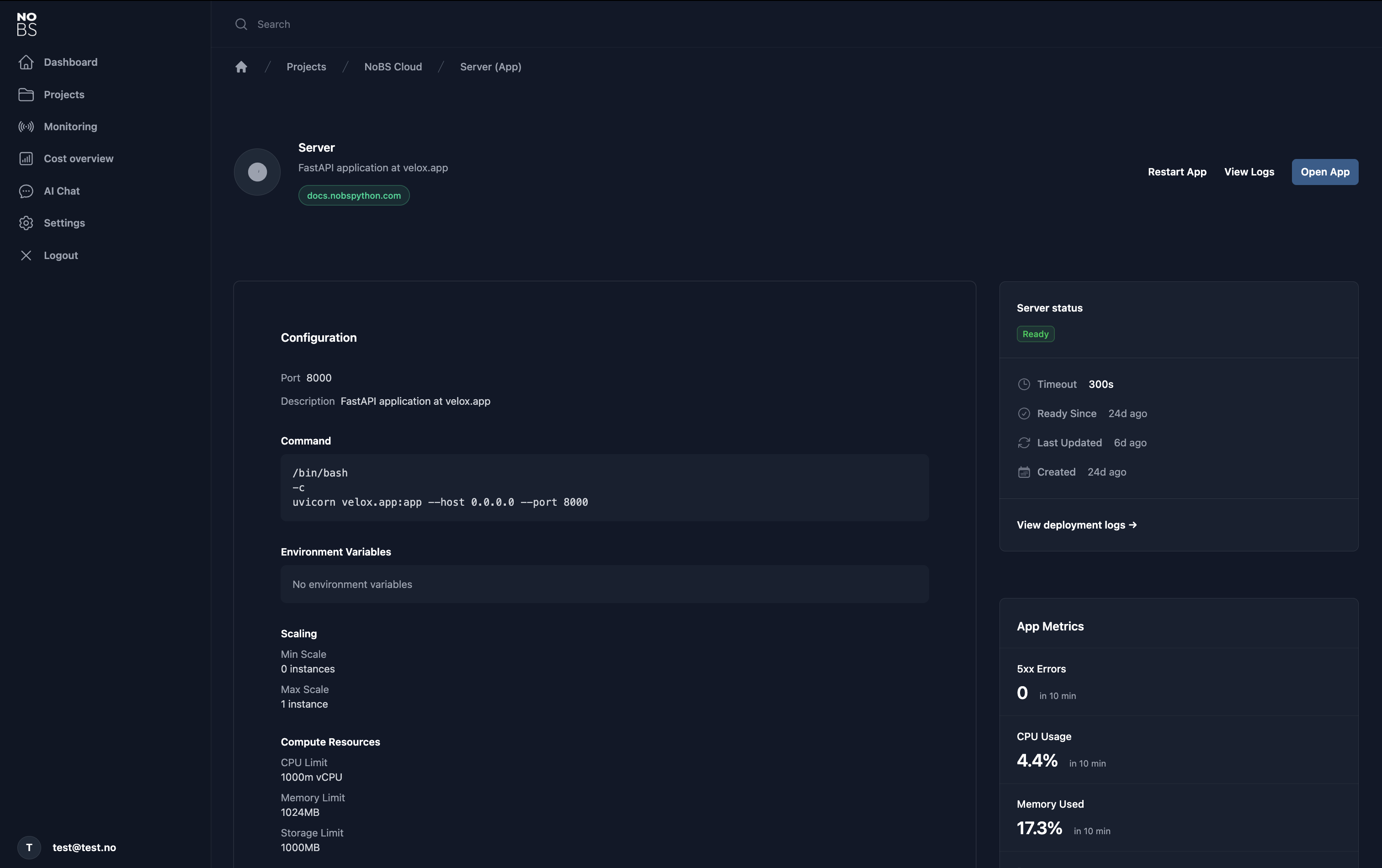
The server hosting this article? Deployed exactly this way.
✗ No Terraform
✗ No Kubernetes manifests
✗ No Docker Compose files
✗ No dedicated DevOps engineers
✓ Just
project.pyandtakk deploy
Running on Scaleway's serverless infrastructure, and managed through Takk Cloud with automated monitoring, logging, and deployment pipelines.
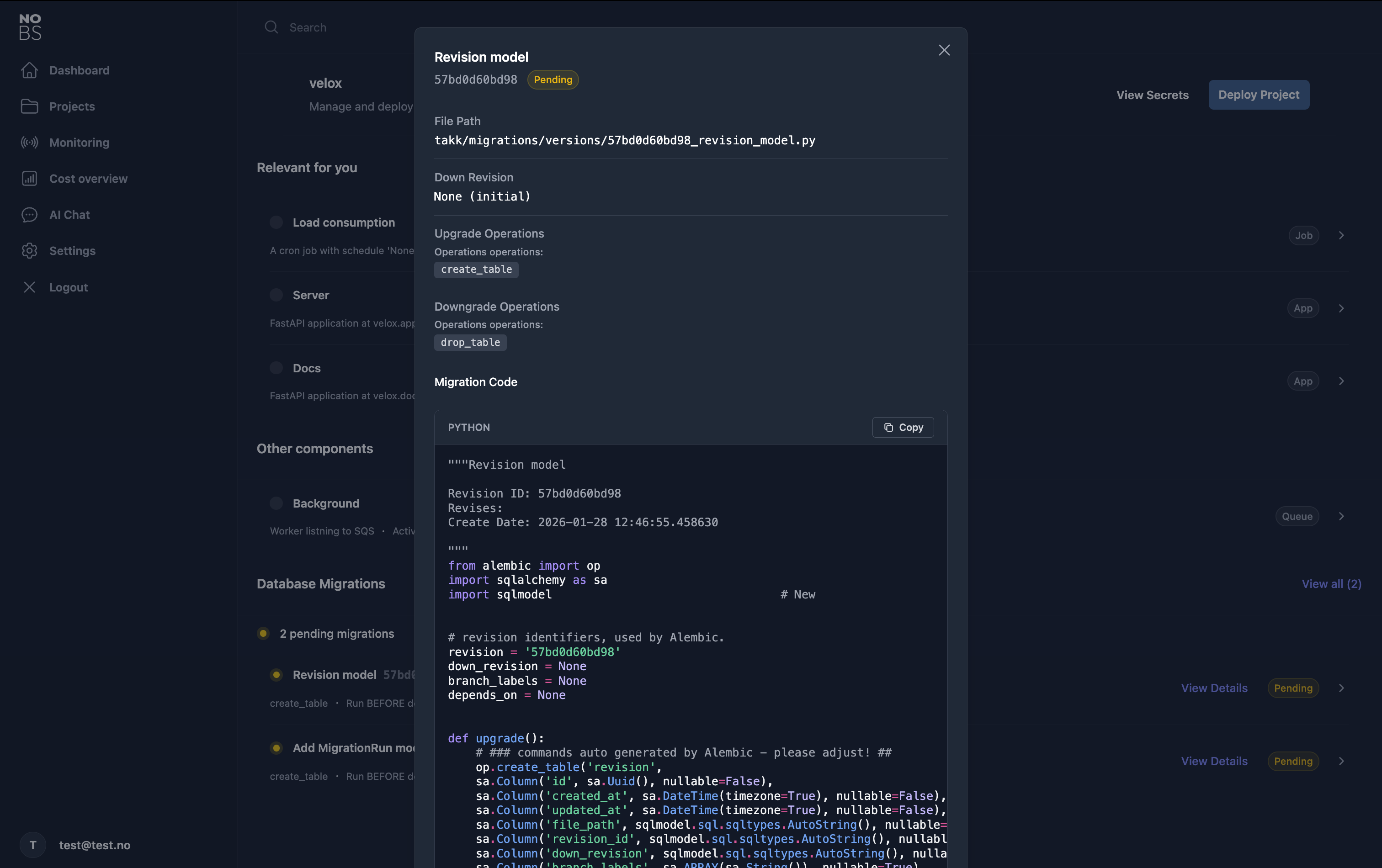
Takk Cloud also understands your Alembic revisions and provides you with a clear overview of all the migrations needed in each environment. It intelligently suggests when to run them based on whether they contain destructive operations or not, helping you avoid accidental data loss in production.
Summary
Tired of maintaining YAML files and Dockerfiles, or constantly unsure which environment variables you need?
uv add takk
Experience infrastructure-as-code in pure Python. Full documentation →
When you're ready to deploy without hiring a DevOps team, Takk Cloud manages multi-environment deployments, monitoring, database migrations, and secrets. All through the same Python-first API.
Takk Cloud is currently in private beta. Join now → to get early access and deploy with takk deploy in minutes.
Pricing models are still in the working, but it is likely to be tier-based similar to Vercel.
Note: For AI agents and LLM integration, documentation is available in Context 7, and we provide an llms.txt file for automated discovery of project resources and API documentation.